NEWNew: Agent is live — chat to generate videos, no parameters neededTry Agent
LogoAI Santa Video
  • AI Santa Video
  • Studio
  • Agent
  • AI Image
  • AI Video
  • PricingUp to 50% off
Fully launched and accessible to all public community membersFebruary 2026

Nano Banana 2 Image Generator

Nano Banana 2, the refreshed hosted image model from the Google product lineup, brings optional web grounding, expanded high-resolution capabilities, and flexible multi-image editing/generation workflows. It’s designed for projects where you need current real-world context, multiple reference assets, or a dynamic creative brief that stays aligned with up-to-date, accurate details.

Loading...

Prompt:

auto

1:1

2:3

3:2

3:4

4:3

9:16

16:9

Model:
Resolution

Loading...

Scene Examples 1
How to use Nano Banana 2

Supercharge your workflow with Nano Banana 2 on this page—use grounded creative briefs and expanded multi-image editing tools

Begin by outlining your core creative vision, add reference images to nail your desired styling or composition, then turn on web grounding only when fresh real-world context will improve your final image.

01

Describe the image before adding grounded detail

First define your subject, composition, artistic style, and desired output format to set a clear creative direction, then add grounded context to your prompt.

02

Add references and web grounding only where they help

Only use up to14 reference images if they help clarify product identity, layout, or aesthetic styling, and enable web grounding only when your final image needs to show timely, real-world info.

03

Check clarity before moving to higher resolution

Verify that your core brief, grounded context, and reference images are all aligned before raising your output to a higher resolution.

Key strengths of Nano Banana 2

What makes Nano Banana 2 stand out for grounded creative projects

Nano Banana 2 excels when your image needs to stay firmly grounded, convey info clearly, or mix multiple reference assets without breaking your creative brief’s practical structure.

Perfect for grounded layouts and realistic scene logic

Nano Banana 2 is best when your image needs to feel connected to a realistic location, consistent object system, or practical scene logic—not just abstract mood.

Great for city posters, travel guides, and real-world environment concept art.
This workflow works when your prompt needs to stay grounded instead of drifting into unclear abstraction.
Choose this model when contextual accuracy matters as much as final visual polish.

Great for explainers and informational boards

Nano Banana 2 also excels for boards that need to clearly explain a system, menu, or product story in a grounded, easy-to-understand way.

Perfect for restaurant explainers, service overview boards, and sleek marketing assets.
It’s best when your image needs to share info, not just look decorative.
Pick this model when clarity is more important than flashy visuals.

Ideal for multi-reference creative workflows

Nano Banana 2 also does well when multiple reference images should support one travel, retail, or product creative direction without hurting your core brief.

Great for travel concept packs, coordinated product systems, and multi-image planning projects.
Your creative brief stays more grounded when each reference image has a clear, specific role.
This is perfect when one reference image can’t cover all needed details.

Perfect for grounded product refresh projects

Nano Banana 2 is a practical choice when you want to refresh a product or object while keeping the final output realistic and structurally consistent.

Great for product updates and more realistic concept revisions.
It works best when your prompt clearly shows the core object’s logic.
Pick this model when grounded, realistic changes are more important than stylized abstract looks.
Best use cases

Top use cases for Nano Banana 2

Nano Banana 2 stands out when your project needs up-to-date context, multiple reference assets, or a grounded creative brief that’s more than just a style-focused one like prompt.

Grounded city guides and local explainers

Ideal for posters, educational explainers, or travel assets that need fresh real-world details, not generic stock photos.

Food, retail, and destination boards

Perfect for restaurant, retail, or travel destination concepts that blend multiple reference images with a timely, up-to-date creative brief.

Multi-reference product and campaign work

Use extra reference images when product identity, aesthetic styling, layout, and supporting context all need to come together into one generated image.

Higher-resolution current-information visuals

Use Nano Banana 2 when you want grounded creative work plus access to 1K, 2K, or 4K output options here.

Prompt prompt patterns and examples

Crafting stronger Nano Banana 2 prompts: real-world examples and best practices

These examples highlight when Nano Banana 2 works best: grounded creative briefs, projects needing up-to-date info, and expanded multi-reference multi-image workflows.

Web-grounded visual

Top-tier prompt Alignment Benchmark Criteria

Ideal for city, event, or local guide visuals that need to feel tied to current, real-world info—not generic stock travel art.
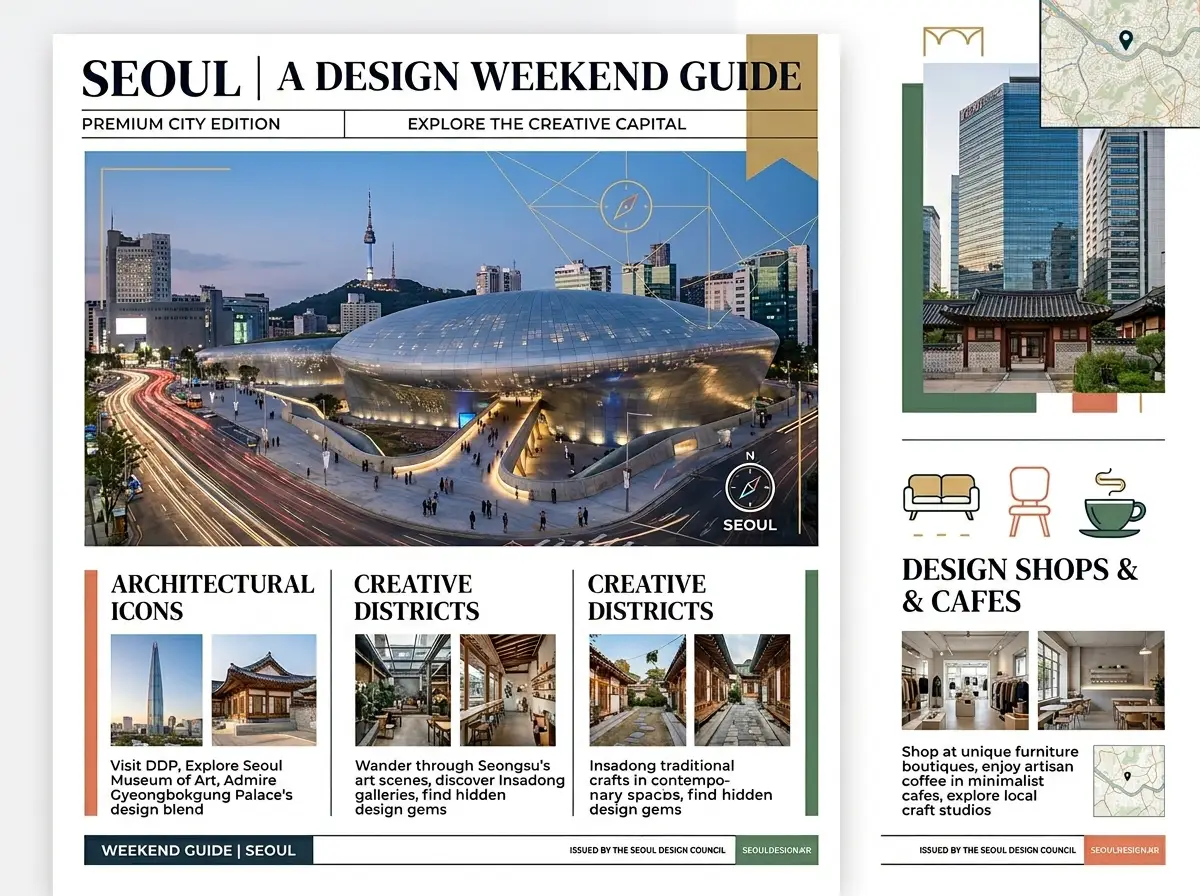
A grounded city guide poster featuring organized local details and a clean, easy-to-read layout.

Grounded city guide poster

Vetted industry-standard Prompt best-practice generation workflow guide

[city / topic] + [what the poster is for] + [grounded details to include] + [layout style] + [readability note]

Explore Full prompt Documentation and Technical SpecsShow Entire Detailed Breakdown

Thorough prompt Breakdown and Summary

Create a premium city guide poster for a weekend creative design retreat in Seoul. Use a clean editorial travel-poster layout: one main cityscape, small supporting location details, and short, easy-to-read headings. Go for a current, modern Seoul creative vibe instead of a generic travel postcard look. Focus on sharp layout structure, intentional typography spacing, and a polished magazine-style city guide feel.

Key Functional Building Blocks That Allow This Prompt To Produce Exceptional, High-quality Outputs

Nano Banana 2 is best here because your brief relies on both current/grounded context and the core visual prompt.

Target Final Generated Project Result

A grounded travel or city guide concept that feels timely and specific, not generic or vaguely timeless.

Pro Insider Tips for Creative Industry Specialists

  • Start by describing your desired output format, then add your grounded contextual details.
  • Only include grounded details that will actually change the final image—don’t list every fact you know about the topic.
Information-led board

Top-tier prompt Alignment Benchmark Criteria

Ideal for educational explainers or promotional boards that mix food styling, clear labels, and timely hospitality context.

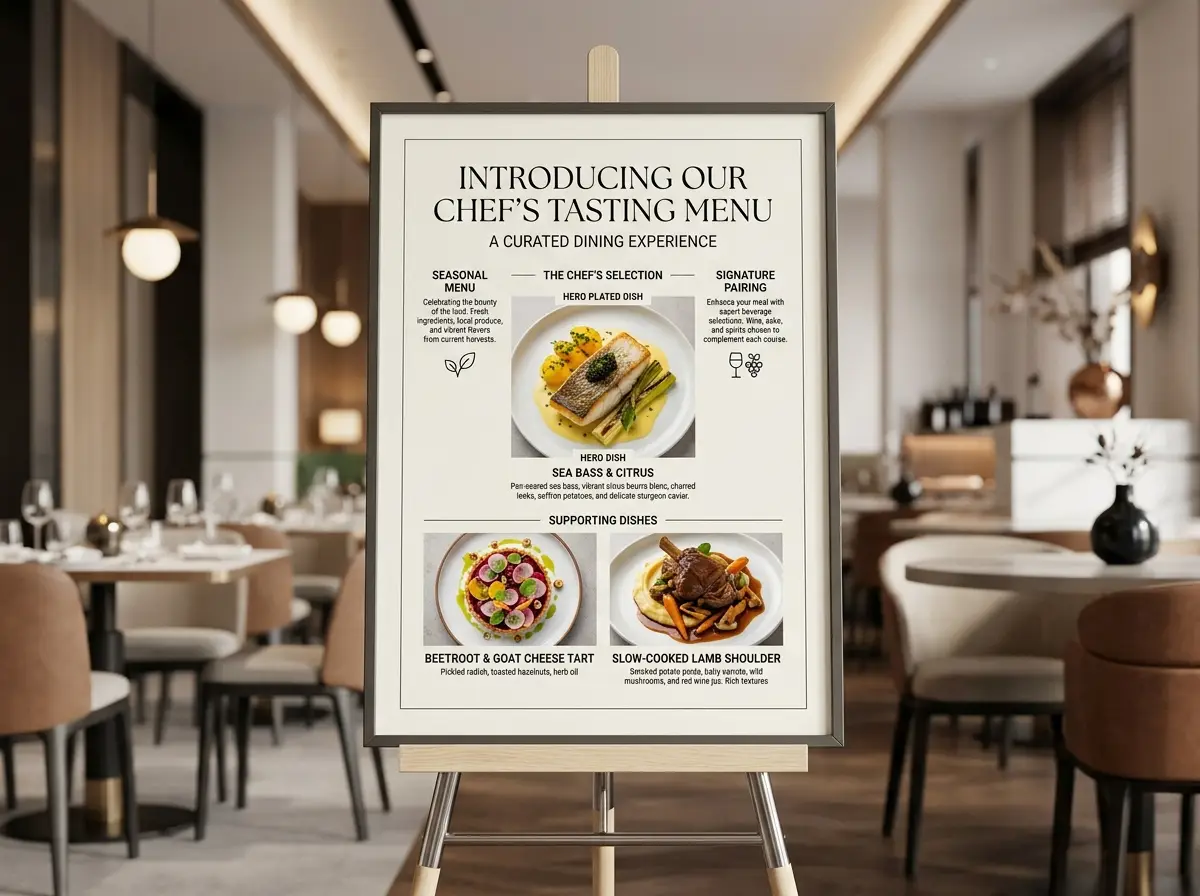
A restaurant explainer board featuring plated food, clear labels, and a polished editorial hospitality layout.

Restaurant explainer board

Vetted industry-standard Prompt best-practice generation workflow guide

[restaurant / menu topic] + [board layout] + [labels or sections] + [grounded context] + [editorial style]

Explore Full prompt Documentation and Technical SpecsShow Entire Detailed Breakdown

Thorough prompt Breakdown and Summary

Make a modern restaurant explainer board for a chef’s exclusive tasting menu launch. Include one main plated dish, two small supporting dish close-ups, and short section labels: "Seasonal Menu", "Chef's Selection", "Signature Pairing". Go for a current upscale dining feel, with a polished editorial layout, subtle typography, and real, authentic hospitality styling.

Key Functional Building Blocks That Allow This Prompt To Produce Exceptional, High-quality Outputs

This prompt mixes layout, food styling, and a timely hospitality frame—making it better for Nano Banana 2 than a purely decorative food prompt.

Target Final Generated Project Result

An organized hospitality board, great for restaurant launches, client promo decks, or editorial dining feature ideas.

Pro Insider Tips for Creative Industry Specialists

  • Use short, easy-to-scan section labels instead of long text blocks.
  • Clearly state what type of current context you need—like upscale dining vibes, local neighborhood flair, or a seasonal launch theme.
Multi-reference concept

Top-tier prompt Alignment Benchmark Criteria

Perfect for travel or retail concept boards that need multiple reference images plus a clear, timely real-world use case.

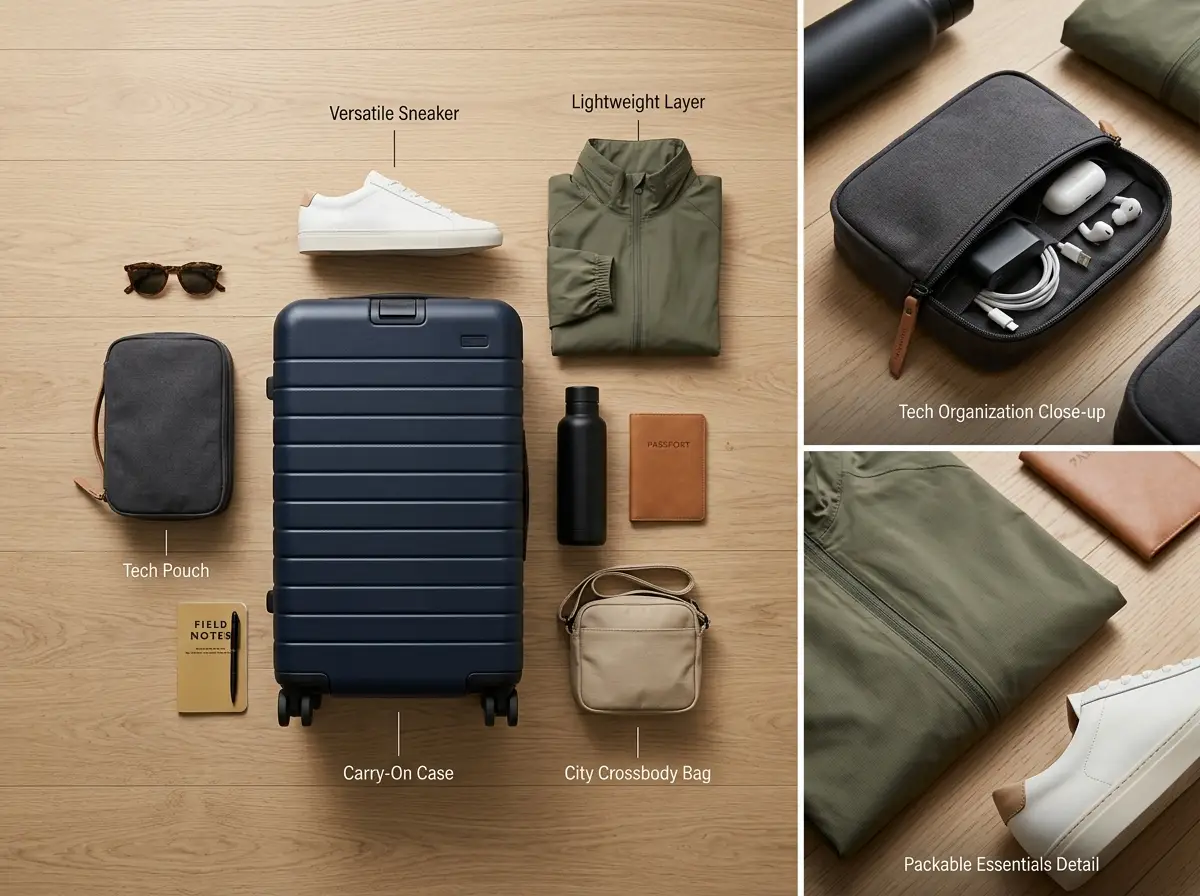
A multi-reference travel essentials board featuring coordinated product styling and clear grounded context.

Multi-reference travel essentials board

Vetted industry-standard Prompt best-practice generation workflow guide

[hero board] + [reference roles] + [current-use context] + [layout style] + [product grouping]

Explore Full prompt Documentation and Technical SpecsShow Entire Detailed Breakdown

Thorough prompt Breakdown and Summary

Create a travel essentials board for a modern city-break packing guide. Use multiple reference images to set the carry-on silhouette, sneaker style, tech pouch design, neutral color palette, and lightweight jacket fit. Provide a realistic premium board with one main flat-lay, two small supporting close-up crops, and short item labels. Keep the styling practical, timely, and editorial—not fancy luxury fantasy.

Key Functional Building Blocks That Allow This Prompt To Produce Exceptional, High-quality Outputs

Nano Banana 2 excels at combining more reference images while still using a timely use case brief, not just a style-focused prompt.

Target Final Generated Project Result

A multi-reference product board that feels tied to a real travel use case, not a vague, generic lifestyle mood board.

Pro Insider Tips for Creative Industry Specialists

  • Assign each reference image you upload a specific, clear role.
  • Clearly name the real-world use case to keep the board feeling practical, not abstract.
Grounded edit

Top-tier prompt Alignment Benchmark Criteria

Ideal for product or campaign refreshes where the final output needs to feature updated details, fresh context, or current market-facing information.

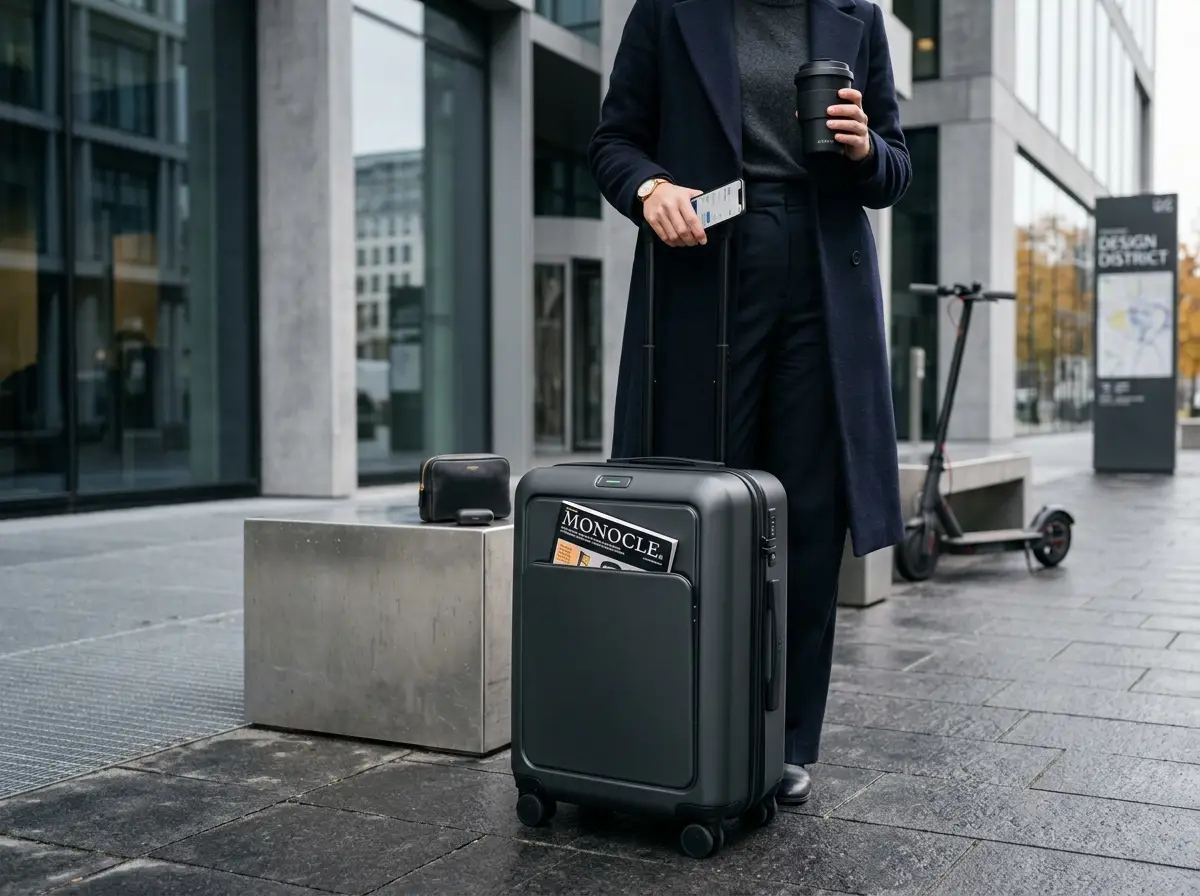
A grounded product refresh concept featuring updated contextual details and a polished campaign-ready presentation.

Grounded product refresh with current details

Vetted industry-standard Prompt best-practice generation workflow guide

[product / scene] + [what should stay] + [what current detail should change] + [layout or campaign format]

Explore Full prompt Documentation and Technical SpecsShow Entire Detailed Breakdown

Thorough prompt Breakdown and Summary

Update the reference product scene to a current-season campaign visual for a smart carry-on bag. Keep the bag’s core shape and premium travel styling, but change the supporting scene, accessory details, and campaign framing to feel like a timely city-travel launch—not an old, generic lifestyle ad. Use natural, realistic lighting, a clean campaign layout, and a grounded urban-travel look.

Key Functional Building Blocks That Allow This Prompt To Produce Exceptional, High-quality Outputs

This prompt keeps the core product identity the same, while asking Nano Banana 2 to update the surrounding context in a realistic, grounded way.

Target Final Generated Project Result

A timely, up-to-date product or campaign refresh that’s more than just a surface-level style change.

Pro Insider Tips for Creative Industry Specialists

  • Clearly list which elements you want to keep before adding new contextual details.
  • Present your grounded context as a creative direction for the scene, not just a list of facts to add.
When to pick Nano Banana 2

Choose Nano Banana 2 when current info and grounding are key to your brief

Nano Banana 2 is best when your image brief needs up-to-date or grounded context, or your workflow needs both multiple reference images and more context than a style-only prompt.

Pick Nano Banana 2 when the image should be grounded, current, or context-aware

Select Nano Banana 2 when your image needs to be grounded, timely, or context-aware. Use this model when up-to-date info, optional web grounding, or an expanded multi-reference setup will alter the final image’s look and feel.

Use another model when polish, speed, or open deployment matter more

Switch to another model when polished final output, fast iteration, or open-source deployment are your top priorities. Pick Nano Banana Pro for a sleeker final render, Nano Banana Flash for faster creative cycles, and Z-Image when open model weights or local deployment are critical to your workflow.

Creator & community insights

Video walkthroughs and independent reviews of Nano Banana 2

These videos show independent creator views on Nano Banana 2 and how real users use it for grounded image generation and organized, structured editing.

Curated Gallery of AI Video Generation Creations

FAQs

FAQ

All About AI Santa Video and Our Official Platform aisantavideo.pro

What is Nano Banana 2?

Nano Banana 2 is the latest hosted model from the Google lineup. It combines smooth image generation, accurate editing, plus optional web grounding, extended multi-image reference support, and flexible high-resolution output directly on this page.

What is Nano Banana 2 best for?

Nano Banana 2 works best for visuals needing current information, educational explainers, travel/food concept boards, targeted multi-reference product edits, and any project where your creative brief relies on fresh, external grounded context.

Does Nano Banana 2 support image input and web grounding here?

Absolutely. On this page, Nano Banana 2 accepts up to 14 reference images, plus optional web grounding. This pairing is ideal for visuals that blend multiple reference assets with timely, real-world facts.

Which resolutions and aspect ratios does Nano Banana 2 support here?

Nano Banana 2 supports 1K, 2K, and 4K output resolutions right here. Aspect ratios include 1:1, 2:3, 3:2, 3:4, 4:3, 9:16, 16:9, plus an auto mode for fast, easy setup.

How do I write better Nano Banana 2 prompts?

To craft better Nano Banana 2 prompts, split your core visual brief from grounded contextual details. First outline your subject, composition, and preferred artistic style, then add the web-sourced or up-to-date info that will guide the final image. When using reference images, assign each a clear role to avoid conflicts between references and grounded context.

When should I use Nano Banana 2 instead of Nano Banana Pro or Flash?

Select Nano Banana 2 when timely info, web grounding, or extended multi-image workflows are must-haves. For fast, budget-friendly creative tweaks without grounded context, use Nano Banana Flash. Choose Nano Banana Pro if your priority is a sleek, high-quality final render.

Is Nano Banana 2 good for explainers and information-led visuals?

Yes, it’s perfect for this type of project. Nano Banana 2 is best when your image needs to share new info, grounded details, or a clear factual structure—rather than just focusing on style like prompt does.

Can I use Nano Banana 2 images commercially?

For professional commercial use, treat Nano Banana 2’s output like any other hosted AI image generator result. All grounded or current-information visuals require standard legal, policy, and factual checks before public sharing.

Still have unanswered questions? Our dedicated support team is ready to help you

Related models

Compare Nano Banana 2 to other image models on this platform

If Nano Banana 2 isn’t right for your project, compare it to these other model pages to see differences in rendering quality, speed, or hosted vs. open workflow tradeoffs.

Nano Banana Pro Pro Image Generator

Try Nano Banana Pro Image Generator when you want a sleeker final render and your creative brief doesn’t need grounded, up-to-date context.

Browse Our Curated Collection of Linked AI Models

Nano Banana Flash Flash Image Generator

Check out Nano Banana Flash Flash Image Generator when your priority is faster edits and smoother creative cycles, not grounded, context-heavy work.

Browse Our Curated Collection of Linked AI Models

GPT-4o GPT-4o Image Generator

Compare options with GPT-4o when clear, easy-to-read text and hosted multi-reference editing are important, but web grounding isn’t your top need.

Browse Our Curated Collection of Linked AI Models

Qwen 2 Image Generator

See Qwen 2 Image Generator if you’re looking for another hosted prompt-focused image model with reference-based generation and a distinct visual style.

Browse Our Curated Collection of Linked AI Models

Start creating with Nano Banana 2 today

Open the generator, start with your core image idea, then add reference images or turn on web grounding only when they’ll actually improve the final result.

Resources
  • AI Santa Video
  • Blog
  • Create
  • Scenes
  • Works
  • Prompts
  • Image to Prompt
  • Batch Image to Prompt
Company & Legal
  • About
  • Contact
  • Privacy Policy
  • Terms of Service
  • Refund Policy
Image Models
  • Z-Image
  • GPT-4o
  • Flux 2
  • Flux 2 Pro
  • Flux 2 Klein
  • Qwen Image 2
  • Seedream 4.0
  • Seedream 4.5
  • Seedream 5.0
  • Grok Imagine
  • Nano Banana Pro
  • NanoBanana Flash
  • Nano Banana 2
Video Models
  • Google Veo 3.1
  • Google Veo 3.1 Lite
  • Google Veo 3.1 Pro
  • Seedance 1.5 Pro
  • Seedance Fast
  • Seedance Quality
  • Seedance 2.0
  • Hailuo 02
  • Kling v2.6
  • Kling v2.5 Turbo
  • Kling v2.1
  • Kling v2.1 Master
  • Kling O1
  • Kling v3.0
  • Kling v3.0 Pro
LogoAI Santa Video

Powered by santa video AI | Fast Video Generation | Professional Quality

TwitterX (Twitter)Email

This website is an independent third-party service built around AI Santa Video workflows. We are not the official website for AI Santa Video, and all product names, model names, and trademarks belong to their respective owners.

© 2026 AI Santa Video All Rights Reserved. CLEANCUT RAZOD LLC

[email protected]